
Compact Digital Camera Adapter - Installation
This guide explains the common microscope-side connection methods for compact digital camera microscope adapters, including C-mount ports, eyepiece tubes, Nikon F-type phototubes, Olympus PT/BH phototubes and JIS phototubes.


Microscope Adapter for Compact Digital Camera
Compact digital camera microscope adapters are supplied as a multi-piece optical and mechanical adapter set.
3-Piece Adapter Set

- a. Main body
- b. 30 mm conversion sleeve
- c. C-mount sleeve
Fixation Sleeve Option

PT Tube Sleeve: NY-BH

JIS Tube Sleeve: NY-JIS
1. C-Mount Installation
For microscopes with a suitable C-mount photo path, the C-mount sleeve can be used to connect the compact camera adapter to the microscope-side C-mount interface.

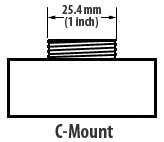

Confirm whether the microscope C-mount path is suitable for this adapter and whether the projected image circle matches the camera-adapter system.
2. Eyepiece Tube Installation
Eyepiece-tube installation depends mainly on the tube inner diameter.
Common microscope eyepiece tubes include 23.2 mm and 30.0 mm sizes.
2-1. 23.2 mm Eyepiece Tube


Tube Size
Eyepiece inside diameter:
23.2 mm (JIS)
2-2. 30.0 mm Eyepiece Tube


Tube Size
Eyepiece inside diameter:
30.0 mm
3. Nikon F-Type Phototube Installation
Some microscope photo ports use a Nikon F-type phototube structure.


4. Olympus PT Phototube Installation
Olympus PT-type phototube installation requires the corresponding phototube sleeve when the microscope-side photo port uses this structure.


NY-BH sleeve may be required.
SZ-PT, SZH-PT, U-SPT, IX-PT and similar Olympus PT-type phototube configurations.

★ Olympus Trinocular with no phototube (only plastic cap)
When there is no phototube attached to trinocular port with cap only,
use Olympus adapter
U-TV1X-2
and
U-CMAD3
(C-mount adapter).

5. Old Olympus / BH-Type Installation
Older Olympus systems and BH-type phototube configurations may require an additional
PT phototube sleeve.


NY-BH option may be required.
6. JIS Phototube Installation
For JIS phototube configurations, the JIS phototube sleeve NY-JIS may be required.


NY-JIS sleeve may be required.